> ## Documentation Index
> Fetch the complete documentation index at: https://docs.open-hive.com/llms.txt
> Use this file to discover all available pages before exploring further.
# CRM
> The system of record your agents read from and write to.
The **CRM** holds the people, companies, and deals your agents work on. It isn't a
separate system you sync with — it's the shared state your colonies read from and write
to as they run.
 ## Setup
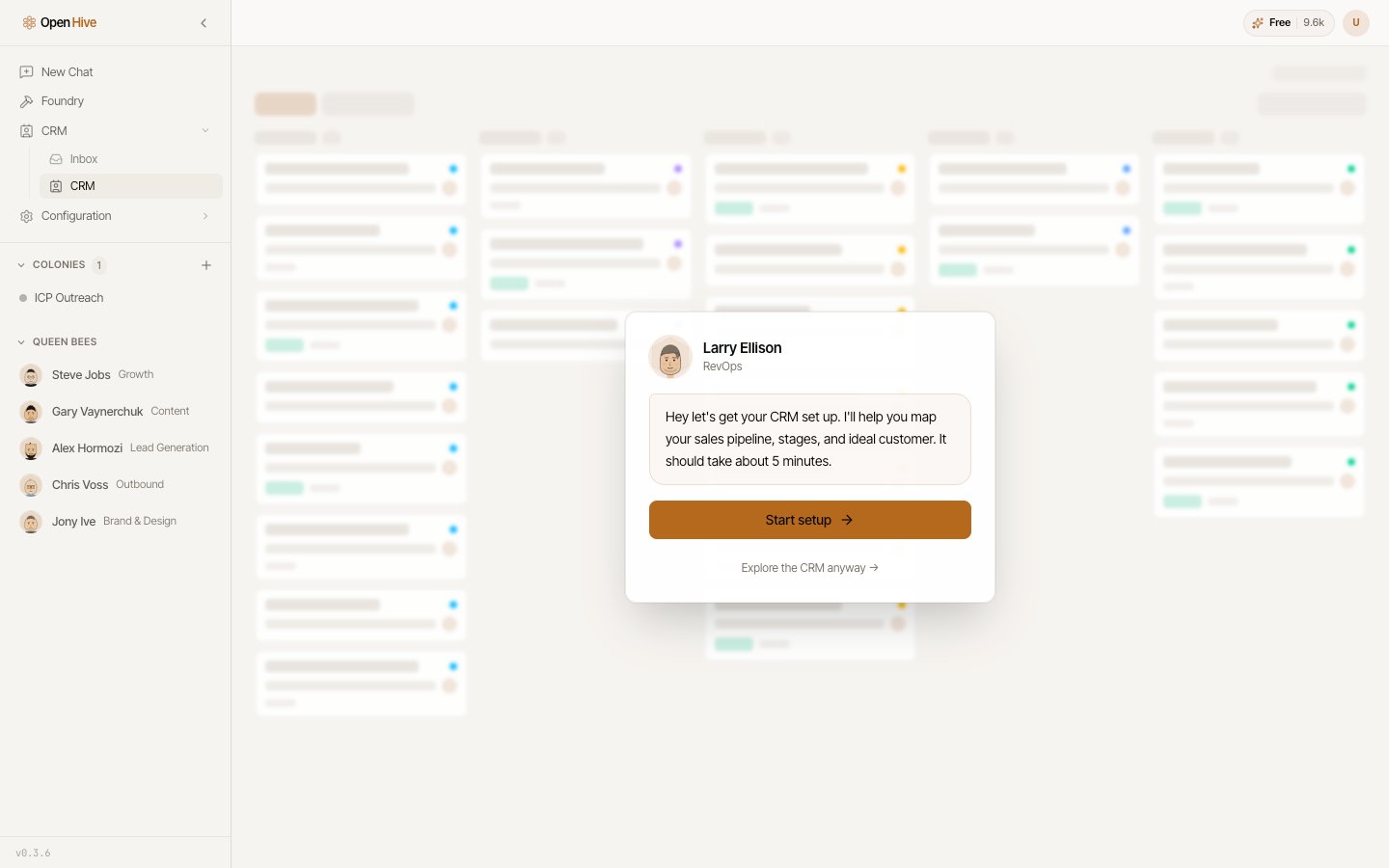
The CRM needs a one-time setup per workspace. Until that's done, the section shows a
setup prompt instead of a grid.
Setup is a guided conversation rather than a form: a RevOps queen walks you through
mapping your sales pipeline, its stages, and your ideal customer. It takes about five
minutes. If you'd rather look around first, **Explore the CRM anyway** opens the section
without committing to setup.
[Inbox](/guides/inbox) stays reachable whether or not the CRM is set up. The two are
gated separately, so an unconfigured CRM never hides your mail.
## The four views
| View | Holds |
| ----------------- | ------------------------------------------------------------------- |
| **People** | Individual contacts. |
| **Organizations** | Companies and accounts. |
| **Opportunities** | Deals in your pipeline. |
| **Activity** | What happened — touches, replies, and events against those records. |
Each view is schema-driven: its columns come from the server, so what you see is the
business-level record. Raw tables, internal IDs, and metadata blobs never reach the
grid.
## Browsing records
* **Filter** on any column to narrow what's shown.
* **Group** records into a board — grouping Opportunities by stage gives you a pipeline
view.
* **Scroll** to page through large sets. Records load in pages rather than all at once,
so a big CRM stays responsive.
## Reading and writing
The grid is **read-only**. You browse, filter, and inspect there, but you don't edit
cells directly.
Writes happen through your agents. Ask a colony to update a record, move a deal, or load
a set of accounts, and it writes through the CRM agent path. This is deliberate: every
change to the system of record arrives with an agent's reasoning attached, rather than
as an untracked manual edit.
## Watching agents build your CRM
When agents are writing, the board refreshes itself — you can watch records appear as a
colony seeds them, instead of reloading to find out whether anything happened. Bursts of
agent writes are batched into a single refresh, so a colony seeding a hundred records
doesn't flicker a hundred times.
## Where records come from
* **[Foundry](/guides/foundry) runs** — the CRM plan artifact declares the stages and
columns a motion needs, and matched buyers load into the first open stage.
* **Colonies** — sourcing and enrichment work writing accounts and contacts as it
confirms them.
* **[Inbox](/guides/inbox)** — the mail bridge writes conversations back onto matching
records, so a reply shows up against the person who sent it.
## Setup
The CRM needs a one-time setup per workspace. Until that's done, the section shows a
setup prompt instead of a grid.
Setup is a guided conversation rather than a form: a RevOps queen walks you through
mapping your sales pipeline, its stages, and your ideal customer. It takes about five
minutes. If you'd rather look around first, **Explore the CRM anyway** opens the section
without committing to setup.
[Inbox](/guides/inbox) stays reachable whether or not the CRM is set up. The two are
gated separately, so an unconfigured CRM never hides your mail.
## The four views
| View | Holds |
| ----------------- | ------------------------------------------------------------------- |
| **People** | Individual contacts. |
| **Organizations** | Companies and accounts. |
| **Opportunities** | Deals in your pipeline. |
| **Activity** | What happened — touches, replies, and events against those records. |
Each view is schema-driven: its columns come from the server, so what you see is the
business-level record. Raw tables, internal IDs, and metadata blobs never reach the
grid.
## Browsing records
* **Filter** on any column to narrow what's shown.
* **Group** records into a board — grouping Opportunities by stage gives you a pipeline
view.
* **Scroll** to page through large sets. Records load in pages rather than all at once,
so a big CRM stays responsive.
## Reading and writing
The grid is **read-only**. You browse, filter, and inspect there, but you don't edit
cells directly.
Writes happen through your agents. Ask a colony to update a record, move a deal, or load
a set of accounts, and it writes through the CRM agent path. This is deliberate: every
change to the system of record arrives with an agent's reasoning attached, rather than
as an untracked manual edit.
## Watching agents build your CRM
When agents are writing, the board refreshes itself — you can watch records appear as a
colony seeds them, instead of reloading to find out whether anything happened. Bursts of
agent writes are batched into a single refresh, so a colony seeding a hundred records
doesn't flicker a hundred times.
## Where records come from
* **[Foundry](/guides/foundry) runs** — the CRM plan artifact declares the stages and
columns a motion needs, and matched buyers load into the first open stage.
* **Colonies** — sourcing and enrichment work writing accounts and contacts as it
confirms them.
* **[Inbox](/guides/inbox)** — the mail bridge writes conversations back onto matching
records, so a reply shows up against the person who sent it.