Connect a delivery account, assign a name and signature, and check which accounts can receive replies.
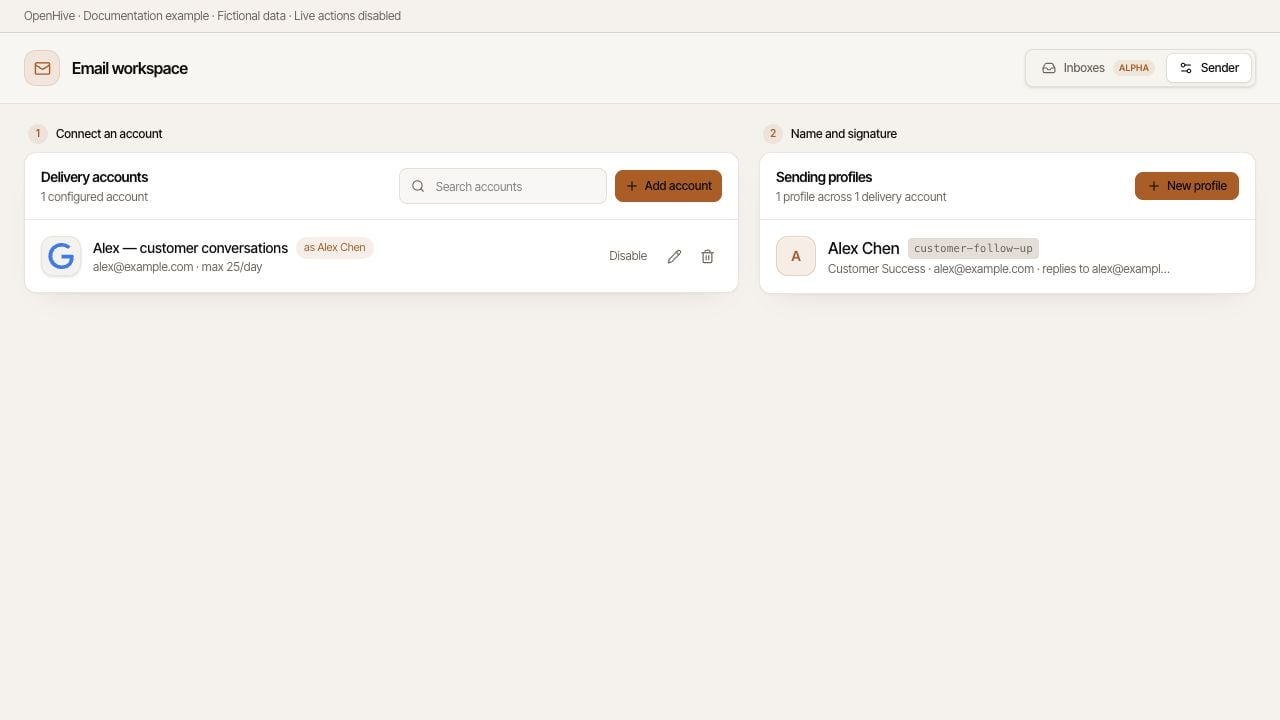
Email setup has two parts: the delivery account that sends the message and the sending profile that supplies its display name and signature. A profile without a usable delivery account cannot send.Open Inbox from the CRM section when email is enabled, then switch to Sender. The current setup layout starts with Connect an account, followed by Name and signature.
Screenshots show the desktop interface with fictional example data. Names, messages, counts, and connection states are illustrative, not account defaults or evidence of live activity.
Delivery accounts and sending profiles have separate controls.
Choose Gmail for the standard connection flow, or an available advanced provider for your setup.
Provider
What to prepare
Gmail
The Google account you want to authorize
HubSpot
A connected account with the required sending access
Other mailbox (SMTP)
Outbound server settings, mailbox credentials, and inbound settings if you need to receive replies
SendGrid
API key and a sender address verified with the provider
Mailjet
API key, secret key, and a sender address verified with the provider
Use the form’s fields and validation messages for the provider you choose. For SMTP, follow the mailbox provider’s authentication instructions; an app password may be required.A provider cannot be changed on an existing sender. Add the appropriate account if you need another provider.
The Gmail connection dialog offers another account when one is already connected.
Create or select a sending profile and assign it to the delivery account. Review the signature preview. When a profile is assigned, its name and signature take precedence over a plain fallback From name.A campaign can select a profile, while the sending pool selects a delivery account carrying that profile. Give profiles names that make their purpose clear, such as Founder introduction or Customer follow-up.
Sending support and inbox support are different capabilities. An SMTP account without inbound settings is send-only. API delivery providers do not automatically provide a readable mailbox just because they can send.Before starting outreach, verify where replies will arrive and that the intended account appears in Inbox. If you choose to send a test message, use a recipient you control and verify both delivery and the reply path.
Where available, Daily limit caps the sender’s volume and Rotation weight controls its share of pooled work. A higher weight gives an account a larger share; it does not grant more provider capacity.Avoid duplicate entries for the same mailbox. They can distort rotation without providing another mailbox’s capacity. Platform restrictions and provider quotas still apply.
The sender form validates credentials when saved and displays known account problems. Reauthorize a revoked connection or fix the fields identified by validation.When replacing a stored secret, follow the form’s instruction about leaving a field blank to keep its current value. Never place the secret in a task prompt.
{"docsConfig":{"theme":"mint","$schema":"https://mintlify.com/docs.json","name":"OpenHive","description":"Documentation for OpenHive — the desktop app for running agent colonies.","colors":{"primary":"#B5691C","light":"#FABE0A","dark":"#B5691C"},"logo":{"light":"https://mintcdn.com/open-hive/KBnRuZMIKg-Do7q7/logo/light.svg?fit=max\u0026auto=format\u0026n=KBnRuZMIKg-Do7q7\u0026q=85\u0026s=8f01f060000a2934d8eba1cf75bbad73","dark":"https://mintcdn.com/open-hive/KBnRuZMIKg-Do7q7/logo/dark.svg?fit=max\u0026auto=format\u0026n=KBnRuZMIKg-Do7q7\u0026q=85\u0026s=7e541f706344da544c756182caca9700","href":"https://open-hive.com"},"favicon":"https://mintcdn.com/open-hive/KBnRuZMIKg-Do7q7/favicon.svg?fit=max\u0026auto=format\u0026n=KBnRuZMIKg-Do7q7\u0026q=85\u0026s=1718d5156763419a5d21aac3f25306f6","navbar":{"links":[{"href":"https://open-hive.com","label":"Website"},{"href":"https://discord.com/invite/MXE49hrKDk","label":"Discord"}],"primary":{"type":"button","label":"Download","href":"https://open-hive.com"}},"footer":{"socials":{"x":"https://x.com/aden_hq","github":"https://github.com/aden-hive","linkedin":"https://www.linkedin.com/company/teamaden","discord":"https://discord.com/invite/MXE49hrKDk"}},"styling":{"latex":false},"navigation":{"pages":[]}},"deployment":{"deploymentMetadataValue":{"subdomain":"open-hive","hasAudioNarration":false,"actualSubdomain":"open-hive","customDomains":["docs.open-hive.com"],"gitSource":{"type":"github","owner":"aden-hive","repo":"open-hive-docs","deployBranch":"main","contentDirectory":"","isPrivate":true,"mountPath":"","label":""},"chroma":{"latestBuiltDeploymentHistoryId":"6a9dd6a41d75eb55a84c3dc4","collectionId":"5c37c505-4e3c-4a0a-b930-714aa315dd6b","liveDeploymentHistoryId":"6a9dd6a41d75eb55a84c3dc4","schemaVersion":"v3"},"entitlements":{},"buildId":"6a9dd6a41d75eb55a84c3dc4","clientVersion":"0.0.3894","searchFilterCounts":[{"language":"default","tag":"Documentation","count":34},{"language":"default","tag":"Colony workspace","count":6},{"language":"default","tag":"Core concepts","count":6},{"language":"default","tag":"Configuration","count":6},{"language":"default","tag":"Guides","count":6},{"language":"default","tag":"Inbox and senders","count":5},{"language":"default","tag":"Get started","count":4},{"language":"default","tag":"API reference","count":2},{"language":"default","tag":"Overview","count":2},{"language":"default","tag":"Account","count":1}]},"assistantConfig":{"enableAskAiButton":false,"enableStarterQuestions":false,"enableContextualStarterQuestions":false,"enableAskAiSearchBar":true},"hasChatPermissions":false,"hasWebMcpPermissions":false,"toggles":[{"name":"kill-isr","enabled":true,"variant":{"name":"disabled","enabled":false,"feature_enabled":true},"impressionData":false},{"name":"agent-mintlify-slack","enabled":true,"variant":{"name":"disabled","enabled":false,"feature_enabled":true},"impressionData":false},{"name":"editor-v7-file-tree","enabled":true,"variant":{"name":"disabled","enabled":false,"feature_enabled":true},"impressionData":false},{"name":"agent-integrations-settings","enabled":true,"variant":{"name":"disabled","enabled":false,"feature_enabled":true},"impressionData":false},{"name":"automations-pr-grouping","enabled":true,"variant":{"name":"disabled","enabled":false,"feature_enabled":true},"impressionData":false},{"name":"custom-prefix","enabled":true,"variant":{"name":"disabled","enabled":false,"feature_enabled":true},"impressionData":false},{"name":"analytics-v7","enabled":true,"variant":{"name":"disabled","enabled":false,"feature_enabled":true},"impressionData":false},{"name":"user-flows-analytics","enabled":true,"variant":{"name":"disabled","enabled":false,"feature_enabled":true},"impressionData":false},{"name":"no-publish-flow","enabled":true,"variant":{"name":"disabled","enabled":false,"feature_enabled":true},"impressionData":false},{"name":"workos-onboarding","enabled":true,"variant":{"name":"disabled","enabled":false,"feature_enabled":true},"impressionData":false},{"name":"llms-txt-v2","enabled":true,"variant":{"name":"disabled","enabled":false,"feature_enabled":true},"impressionData":false},{"name":"pause-universal-search-reconcile","enabled":true,"variant":{"name":"disabled","enabled":false,"feature_enabled":true},"impressionData":false},{"name":"snapshot-serving-live","enabled":true,"variant":{"name":"disabled","enabled":false,"feature_enabled":true},"impressionData":false},{"name":"stripTemperatureMiddleware","enabled":true,"variant":{"name":"disabled","enabled":false,"feature_enabled":true},"impressionData":false},{"name":"per-site-search-delta","enabled":true,"variant":{"name":"disabled","enabled":false,"feature_enabled":true},"impressionData":false},{"name":"support-platform-pylon-zendesk","enabled":true,"variant":{"name":"disabled","enabled":false,"feature_enabled":true},"impressionData":false},{"name":"editor-branches-v2-autocommit","enabled":true,"variant":{"name":"disabled","enabled":false,"feature_enabled":true},"impressionData":false},{"name":"editor-branches-v2","enabled":true,"variant":{"name":"disabled","enabled":false,"feature_enabled":true},"impressionData":false},{"name":"snapshot-serving","enabled":true,"variant":{"name":"disabled","enabled":false,"feature_enabled":true},"impressionData":false},{"name":"instant-rollback","enabled":true,"variant":{"name":"disabled","enabled":false,"feature_enabled":true},"impressionData":false},{"name":"granular-notifications-server","enabled":true,"variant":{"name":"disabled","enabled":false,"feature_enabled":true},"impressionData":false},{"name":"granular-notifications","enabled":true,"variant":{"name":"disabled","enabled":false,"feature_enabled":true},"impressionData":false},{"name":"editor-private-page-search","enabled":true,"variant":{"name":"disabled","enabled":false,"feature_enabled":true},"impressionData":false},{"name":"automations-fable","enabled":true,"variant":{"name":"disabled","enabled":false,"feature_enabled":true},"impressionData":false},{"name":"fixed-ai-action-pricing","enabled":true,"variant":{"name":"disabled","enabled":false,"feature_enabled":true},"impressionData":false},{"name":"automation-resolve-merge-conflict","enabled":true,"variant":{"name":"disabled","enabled":false,"feature_enabled":true},"impressionData":false},{"name":"scoped-publishing","enabled":true,"variant":{"name":"disabled","enabled":false,"feature_enabled":true},"impressionData":false},{"name":"mintql","enabled":true,"variant":{"name":"disabled","enabled":false,"feature_enabled":true},"impressionData":false},{"name":"page-level-analytics","enabled":true,"variant":{"name":"disabled","enabled":false,"feature_enabled":true},"impressionData":false},{"name":"teamspace","enabled":true,"variant":{"name":"disabled","enabled":false,"feature_enabled":true},"impressionData":false},{"name":"editor-version-history-v2","enabled":true,"variant":{"name":"disabled","enabled":false,"feature_enabled":true},"impressionData":false},{"name":"vite-origin","enabled":true,"variant":{"name":"disabled","enabled":false,"feature_enabled":true},"impressionData":false},{"name":"editor-nav-generations","enabled":true,"variant":{"name":"disabled","enabled":false,"feature_enabled":true},"impressionData":false},{"name":"workspace-projects","enabled":true,"variant":{"name":"disabled","enabled":false,"feature_enabled":true},"impressionData":false},{"name":"assistant-v5","enabled":true,"variant":{"name":"disabled","enabled":false,"feature_enabled":true},"impressionData":false},{"name":"byok-sep-25","enabled":true,"variant":{"name":"disabled","enabled":false,"feature_enabled":true},"impressionData":false},{"name":"revalidation-jwt","enabled":true,"variant":{"name":"disabled","enabled":false,"feature_enabled":true},"impressionData":false},{"name":"editor-agent-model-picker","enabled":true,"variant":{"name":"disabled","enabled":false,"feature_enabled":true},"impressionData":false},{"name":"client-snapshot-docs-config","enabled":true,"variant":{"name":"disabled","enabled":false,"feature_enabled":true},"impressionData":false},{"name":"hobby-abuse-scan","enabled":true,"variant":{"name":"disabled","enabled":false,"feature_enabled":true},"impressionData":false}],"isAtlas":false,"googleFontsInlined":false},"customCss":[],"page":{"pagePath":"configuration/senders","slug":"/configuration/senders","pageMetadata":{"title":"Delivery accounts: connect a sender","description":"Connect a delivery account, assign a name and signature, and check which accounts can receive replies.","sidebarTitle":"Delivery accounts","href":"/configuration/senders"},"description":{"compiledSource":"\"use strict\";\nconst {jsx: _jsx} = arguments[0];\nconst {useMDXComponents: _provideComponents} = arguments[0];\nfunction _createMdxContent(props) {\n const _components = {\n p: \"p\",\n ..._provideComponents(),\n ...props.components\n };\n return _jsx(_components.p, {\n children: \"Connect a delivery account, assign a name and signature, and check which accounts can receive replies.\"\n });\n}\nfunction MDXContent(props = {}) {\n const {wrapper: MDXLayout} = {\n ..._provideComponents(),\n ...props.components\n };\n return MDXLayout ? _jsx(MDXLayout, {\n ...props,\n children: _jsx(_createMdxContent, {\n ...props\n })\n }) : _createMdxContent(props);\n}\nreturn {\n default: MDXContent\n};\n","frontmatter":{},"scope":{}},"pageType":"default","mdx":{"mdxSource":{"compiledSource":"\"use strict\";const{Fragment:_Fragment,jsx:_jsx,jsxs:_jsxs}=arguments[0];const{useMDXComponents:_provideComponents}=arguments[0];function _createMdxContent(props){const _components={a:`a`,p:`p`,strong:`strong`,tbody:`tbody`,td:`td`,th:`th`,thead:`thead`,tr:`tr`,..._provideComponents(),...props.components},{Frame,Heading,Note,OptimizedImage,Table}=_components;if(!Frame)_missingMdxReference(`Frame`,true);if(!Heading)_missingMdxReference(`Heading`,true);if(!Note)_missingMdxReference(`Note`,true);if(!OptimizedImage)_missingMdxReference(`OptimizedImage`,true);if(!Table)_missingMdxReference(`Table`,true);return _jsxs(_Fragment,{children:[_jsxs(_components.p,{children:[`Email setup has two parts: the `,_jsx(_components.strong,{children:`delivery account`}),` that sends the message and the `,_jsx(_components.strong,{children:`sending profile`}),` that supplies its display name and signature. A profile without a usable delivery account cannot send.`]}),`\n`,_jsxs(_components.p,{children:[`Open `,_jsx(_components.strong,{children:`Inbox`}),` from the CRM section when email is enabled, then switch to `,_jsx(_components.strong,{children:`Sender`}),`. The current setup layout starts with `,_jsx(_components.strong,{children:`Connect an account`}),`, followed by `,_jsx(_components.strong,{children:`Name and signature`}),`.`]}),`\n`,_jsx(Note,{children:_jsx(_components.p,{children:`Screenshots show the desktop interface with fictional example data. Names, messages, counts, and connection states are illustrative, not account defaults or evidence of live activity.`})}),`\n`,_jsx(Frame,{caption:`Delivery accounts and sending profiles have separate controls.`,children:_jsx(OptimizedImage,{src:`https://mintcdn.com/open-hive/pgmm5ty3-3Z8tA3I/images/email-sender-overview.jpg?fit=max\u0026auto=format\u0026n=pgmm5ty3-3Z8tA3I\u0026q=85\u0026s=058b99e2862c5aa8eb3ecaae67f4a4d9`,alt:`Delivery accounts and sending profiles have separate controls.`,\"data-og-width\":`1280`,width:`1280`,\"data-og-height\":`720`,height:`720`,\"data-path\":`images/email-sender-overview.jpg`,\"data-optimize\":`true`,\"data-opv\":`3`,srcset:`https://mintcdn.com/open-hive/pgmm5ty3-3Z8tA3I/images/email-sender-overview.jpg?w=280\u0026fit=max\u0026auto=format\u0026n=pgmm5ty3-3Z8tA3I\u0026q=85\u0026s=7fd7a5e17e831867450d6598ee09608e 280w, https://mintcdn.com/open-hive/pgmm5ty3-3Z8tA3I/images/email-sender-overview.jpg?w=560\u0026fit=max\u0026auto=format\u0026n=pgmm5ty3-3Z8tA3I\u0026q=85\u0026s=4d70b84aa3e2dc19191489493325dc29 560w, https://mintcdn.com/open-hive/pgmm5ty3-3Z8tA3I/images/email-sender-overview.jpg?w=840\u0026fit=max\u0026auto=format\u0026n=pgmm5ty3-3Z8tA3I\u0026q=85\u0026s=b0cbbd4915150430130a3b9f14907458 840w, https://mintcdn.com/open-hive/pgmm5ty3-3Z8tA3I/images/email-sender-overview.jpg?w=1100\u0026fit=max\u0026auto=format\u0026n=pgmm5ty3-3Z8tA3I\u0026q=85\u0026s=18b7bf769cc64b0bfe12ace4ce443a22 1100w, https://mintcdn.com/open-hive/pgmm5ty3-3Z8tA3I/images/email-sender-overview.jpg?w=1650\u0026fit=max\u0026auto=format\u0026n=pgmm5ty3-3Z8tA3I\u0026q=85\u0026s=10ada586a08ecaa6f45a7bd4635a90c5 1650w, https://mintcdn.com/open-hive/pgmm5ty3-3Z8tA3I/images/email-sender-overview.jpg?w=2500\u0026fit=max\u0026auto=format\u0026n=pgmm5ty3-3Z8tA3I\u0026q=85\u0026s=21cdb260517fae5e492d4037c641f5b2 2500w`})}),`\n`,_jsx(Heading,{level:`2`,id:`connect-a-delivery-account`,children:`Connect a delivery account`}),`\n`,_jsx(_components.p,{children:`Choose Gmail for the standard connection flow, or an available advanced provider for your setup.`}),`\n`,_jsxs(Table,{children:[_jsx(_components.thead,{children:_jsxs(_components.tr,{children:[_jsx(_components.th,{children:`Provider`}),_jsx(_components.th,{children:`What to prepare`})]})}),_jsxs(_components.tbody,{children:[_jsxs(_components.tr,{children:[_jsx(_components.td,{children:_jsx(_components.strong,{children:`Gmail`})}),_jsx(_components.td,{children:`The Google account you want to authorize`})]}),_jsxs(_components.tr,{children:[_jsx(_components.td,{children:_jsx(_components.strong,{children:`HubSpot`})}),_jsx(_components.td,{children:`A connected account with the required sending access`})]}),_jsxs(_components.tr,{children:[_jsx(_components.td,{children:_jsx(_components.strong,{children:`Other mailbox (SMTP)`})}),_jsx(_components.td,{children:`Outbound server settings, mailbox credentials, and inbound settings if you need to receive replies`})]}),_jsxs(_components.tr,{children:[_jsx(_components.td,{children:_jsx(_components.strong,{children:`SendGrid`})}),_jsx(_components.td,{children:`API key and a sender address verified with the provider`})]}),_jsxs(_components.tr,{children:[_jsx(_components.td,{children:_jsx(_components.strong,{children:`Mailjet`})}),_jsx(_components.td,{children:`API key, secret key, and a sender address verified with the provider`})]})]})]}),`\n`,_jsx(_components.p,{children:`Use the form’s fields and validation messages for the provider you choose. For SMTP, follow the mailbox provider’s authentication instructions; an app password may be required.`}),`\n`,_jsx(_components.p,{children:`A provider cannot be changed on an existing sender. Add the appropriate account if you need another provider.`}),`\n`,_jsx(Frame,{caption:`The Gmail connection dialog offers another account when one is already connected.`,children:_jsx(OptimizedImage,{src:`https://mintcdn.com/open-hive/pgmm5ty3-3Z8tA3I/images/email-add-gmail.jpg?fit=max\u0026auto=format\u0026n=pgmm5ty3-3Z8tA3I\u0026q=85\u0026s=6659fb13c58880eda1691b8d6c2c7ea4`,alt:`The Gmail connection dialog offers another account when one is already connected.`,\"data-og-width\":`1280`,width:`1280`,\"data-og-height\":`720`,height:`720`,\"data-path\":`images/email-add-gmail.jpg`,\"data-optimize\":`true`,\"data-opv\":`3`,srcset:`https://mintcdn.com/open-hive/pgmm5ty3-3Z8tA3I/images/email-add-gmail.jpg?w=280\u0026fit=max\u0026auto=format\u0026n=pgmm5ty3-3Z8tA3I\u0026q=85\u0026s=5aaa346bd48e38a38f1e76b57303cef1 280w, https://mintcdn.com/open-hive/pgmm5ty3-3Z8tA3I/images/email-add-gmail.jpg?w=560\u0026fit=max\u0026auto=format\u0026n=pgmm5ty3-3Z8tA3I\u0026q=85\u0026s=5b4fdc13ebbf69f4803977382ffc359b 560w, https://mintcdn.com/open-hive/pgmm5ty3-3Z8tA3I/images/email-add-gmail.jpg?w=840\u0026fit=max\u0026auto=format\u0026n=pgmm5ty3-3Z8tA3I\u0026q=85\u0026s=c2be55d74f4969da843f2a335d9cb836 840w, https://mintcdn.com/open-hive/pgmm5ty3-3Z8tA3I/images/email-add-gmail.jpg?w=1100\u0026fit=max\u0026auto=format\u0026n=pgmm5ty3-3Z8tA3I\u0026q=85\u0026s=ee6b447071688f5f53171ab90a1678c5 1100w, https://mintcdn.com/open-hive/pgmm5ty3-3Z8tA3I/images/email-add-gmail.jpg?w=1650\u0026fit=max\u0026auto=format\u0026n=pgmm5ty3-3Z8tA3I\u0026q=85\u0026s=918fe32340720a143b543762e8d59195 1650w, https://mintcdn.com/open-hive/pgmm5ty3-3Z8tA3I/images/email-add-gmail.jpg?w=2500\u0026fit=max\u0026auto=format\u0026n=pgmm5ty3-3Z8tA3I\u0026q=85\u0026s=c54c3d901fb8a62f4e891bbdfbbdbf8c 2500w`})}),`\n`,_jsx(Heading,{level:`2`,id:`set-the-name-and-signature`,children:`Set the name and signature`}),`\n`,_jsxs(_components.p,{children:[_jsx(_components.a,{href:`/email/sending-profiles`,children:`Create or select a sending profile`}),` and assign it to the delivery account. Review the signature preview. When a profile is assigned, its name and signature take precedence over a plain fallback From name.`]}),`\n`,_jsxs(_components.p,{children:[`A campaign can select a profile, while the sending pool selects a delivery account carrying that profile. Give profiles names that make their purpose clear, such as `,_jsx(_components.strong,{children:`Founder introduction`}),` or `,_jsx(_components.strong,{children:`Customer follow-up`}),`.`]}),`\n`,_jsx(Heading,{level:`2`,id:`confirm-reply-handling`,children:`Confirm reply handling`}),`\n`,_jsx(_components.p,{children:`Sending support and inbox support are different capabilities. An SMTP account without inbound settings is send-only. API delivery providers do not automatically provide a readable mailbox just because they can send.`}),`\n`,_jsxs(_components.p,{children:[`Before starting outreach, verify where replies will arrive and that the intended account appears in `,_jsx(_components.a,{href:`/guides/inbox`,children:`Inbox`}),`. If you choose to send a test message, use a recipient you control and verify both delivery and the reply path.`]}),`\n`,_jsx(Heading,{level:`2`,id:`set-volume-deliberately`,children:`Set volume deliberately`}),`\n`,_jsxs(_components.p,{children:[`Where available, `,_jsx(_components.strong,{children:`Daily limit`}),` caps the sender’s volume and `,_jsx(_components.strong,{children:`Rotation weight`}),` controls its share of pooled work. A higher weight gives an account a larger share; it does not grant more provider capacity.`]}),`\n`,_jsx(_components.p,{children:`Avoid duplicate entries for the same mailbox. They can distort rotation without providing another mailbox’s capacity. Platform restrictions and provider quotas still apply.`}),`\n`,_jsx(Heading,{level:`2`,id:`resolve-account-errors`,children:`Resolve account errors`}),`\n`,_jsx(_components.p,{children:`The sender form validates credentials when saved and displays known account problems. Reauthorize a revoked connection or fix the fields identified by validation.`}),`\n`,_jsx(_components.p,{children:`When replacing a stored secret, follow the form’s instruction about leaving a field blank to keep its current value. Never place the secret in a task prompt.`})]})}function MDXContent(props={}){const{wrapper:MDXLayout}={..._provideComponents(),...props.components};return MDXLayout?_jsx(MDXLayout,{...props,children:_jsx(_createMdxContent,{...props})}):_createMdxContent(props)}return{default:MDXContent};function _missingMdxReference(id,component){throw new Error(`Expected `+(component?`component`:`object`)+\" `\"+id+\"` to be defined: you likely forgot to import, pass, or provide it.\")}","frontmatter":{},"scope":{"config":{},"pageMetadata":{"title":"Delivery accounts: connect a sender","description":"Connect a delivery account, assign a name and signature, and check which accounts can receive replies.","sidebarTitle":"Delivery accounts","href":"/configuration/senders"}}},"mdxSourceWithNoJs":null},"mdxExtracts":{"tableOfContents":[{"title":"Connect a delivery account","slug":"connect-a-delivery-account","depth":2,"children":[]},{"title":"Set the name and signature","slug":"set-the-name-and-signature","depth":2,"children":[]},{"title":"Confirm reply handling","slug":"confirm-reply-handling","depth":2,"children":[]},{"title":"Set volume deliberately","slug":"set-volume-deliberately","depth":2,"children":[]},{"title":"Resolve account errors","slug":"resolve-account-errors","depth":2,"children":[]}],"codeExamples":{}},"jsLinks":[],"subdomain":"open-hive","siteName":"OpenHive","title":"Delivery accounts: connect a sender - OpenHive","navMaps":{"firstHrefInVersion":{},"firstHrefInLanguage":{}},"lastModified":"2026-09-06T20:45:41.647Z","originalFileLocation":"configuration/senders.mdx"},"headHtml":"\u003cmeta data-mint-head name=\"description\" content=\"Connect a delivery account, assign a name and signature, and check which accounts can receive replies.\">\u003cmeta data-mint-head name=\"application-name\" content=\"OpenHive\">\u003cmeta data-mint-head name=\"generator\" content=\"Mintlify\">\u003clink data-mint-head rel=\"icon\" type=\"image/png\" sizes=\"192x192\" href=\"/mintlify-assets/_mintlify/favicons/open-hive/cyvY73COFAppaB9_/_generated/favicon/android-chrome-192x192.png\" media=\"(prefers-color-scheme: light)\">\u003clink data-mint-head rel=\"apple-touch-icon\" type=\"image/png\" sizes=\"180x180\" href=\"/mintlify-assets/_mintlify/favicons/open-hive/cyvY73COFAppaB9_/_generated/favicon/apple-touch-icon.png\">\u003clink data-mint-head rel=\"icon\" type=\"image/png\" sizes=\"16x16\" href=\"/mintlify-assets/_mintlify/favicons/open-hive/cyvY73COFAppaB9_/_generated/favicon/favicon-16x16.png\" media=\"(prefers-color-scheme: light)\">\u003clink data-mint-head rel=\"icon\" type=\"image/png\" sizes=\"32x32\" href=\"/mintlify-assets/_mintlify/favicons/open-hive/cyvY73COFAppaB9_/_generated/favicon/favicon-32x32.png\" media=\"(prefers-color-scheme: light)\">\u003clink data-mint-head rel=\"shortcut icon\" type=\"image/x-icon\" href=\"/mintlify-assets/_mintlify/favicons/open-hive/cyvY73COFAppaB9_/_generated/favicon/favicon.ico\" media=\"(prefers-color-scheme: light)\">\u003clink data-mint-head rel=\"icon\" type=\"image/png\" sizes=\"192x192\" href=\"/mintlify-assets/_mintlify/favicons/open-hive/cyvY73COFAppaB9_/_generated/favicon-dark/android-chrome-192x192.png\" media=\"(prefers-color-scheme: dark)\">\u003clink data-mint-head rel=\"icon\" type=\"image/png\" sizes=\"16x16\" href=\"/mintlify-assets/_mintlify/favicons/open-hive/cyvY73COFAppaB9_/_generated/favicon-dark/favicon-16x16.png\" media=\"(prefers-color-scheme: dark)\">\u003clink data-mint-head rel=\"icon\" type=\"image/png\" sizes=\"32x32\" href=\"/mintlify-assets/_mintlify/favicons/open-hive/cyvY73COFAppaB9_/_generated/favicon-dark/favicon-32x32.png\" media=\"(prefers-color-scheme: dark)\">\u003clink data-mint-head rel=\"shortcut icon\" type=\"image/x-icon\" href=\"/mintlify-assets/_mintlify/favicons/open-hive/cyvY73COFAppaB9_/_generated/favicon-dark/favicon.ico\" media=\"(prefers-color-scheme: dark)\">\u003cmeta data-mint-head property=\"og:title\" content=\"Delivery accounts: connect a sender - OpenHive\">\u003cmeta data-mint-head property=\"og:description\" content=\"Connect a delivery account, assign a name and signature, and check which accounts can receive replies.\">\u003cmeta data-mint-head property=\"og:site_name\" content=\"OpenHive\">\u003cmeta data-mint-head property=\"og:url\" content=\"https://docs.open-hive.com/configuration/senders\">\u003cmeta data-mint-head property=\"og:type\" content=\"website\">\u003cmeta data-mint-head name=\"twitter:card\" content=\"summary_large_image\">\u003cmeta data-mint-head name=\"twitter:title\" content=\"Delivery accounts: connect a sender - OpenHive\">\u003cmeta data-mint-head name=\"twitter:description\" content=\"Connect a delivery account, assign a name and signature, and check which accounts can receive replies.\">\u003cmeta data-mint-head name=\"msapplication-config\" content=\"/mintlify-assets/_mintlify/favicons/open-hive/cyvY73COFAppaB9_/_generated/favicon/browserconfig.xml\">\u003cmeta data-mint-head name=\"apple-mobile-web-app-title\" content=\"OpenHive\">\u003cmeta data-mint-head name=\"msapplication-TileColor\" content=\"#B5691C\">\u003clink data-mint-head rel=\"canonical\" href=\"https://docs.open-hive.com/configuration/senders\">\u003clink data-mint-head rel=\"alternate\" type=\"application/xml\" href=\"/sitemap.xml\">\u003clink data-mint-head rel=\"alternate\" type=\"text/markdown\" href=\"/configuration/senders.md\">\u003cscript data-mint-head type=\"application/ld+json\">{\"@context\":\"https://schema.org\",\"@graph\":[{\"@type\":\"Organization\",\"@id\":\"https://docs.open-hive.com/#organization\",\"name\":\"OpenHive\",\"url\":\"https://docs.open-hive.com\",\"logo\":{\"@type\":\"ImageObject\",\"url\":\"https://mintcdn.com/open-hive/KBnRuZMIKg-Do7q7/logo/light.svg?fit=max\u0026auto=format\u0026n=KBnRuZMIKg-Do7q7\u0026q=85\u0026s=8f01f060000a2934d8eba1cf75bbad73\"}},{\"@type\":\"WebSite\",\"@id\":\"https://docs.open-hive.com#website\",\"name\":\"OpenHive\",\"url\":\"https://docs.open-hive.com\",\"publisher\":{\"@id\":\"https://docs.open-hive.com/#organization\"}},{\"@type\":\"WebPage\",\"@id\":\"https://docs.open-hive.com/configuration/senders#webpage\",\"url\":\"https://docs.open-hive.com/configuration/senders\",\"name\":\"Delivery accounts: connect a sender\",\"description\":\"Connect a delivery account, assign a name and signature, and check which accounts can receive replies.\",\"dateModified\":\"2026-09-06T20:45:41.647Z\",\"isPartOf\":{\"@id\":\"https://docs.open-hive.com#website\"},\"breadcrumb\":{\"@id\":\"https://docs.open-hive.com/configuration/senders#breadcrumb\"}},{\"@type\":\"BreadcrumbList\",\"@id\":\"https://docs.open-hive.com/configuration/senders#breadcrumb\",\"itemListElement\":[{\"@type\":\"ListItem\",\"position\":1,\"name\":\"Inbox and senders\",\"item\":\"https://docs.open-hive.com/email/overview\"},{\"@type\":\"ListItem\",\"position\":2,\"name\":\"Delivery accounts: connect a sender\",\"item\":\"https://docs.open-hive.com/configuration/senders\"}]},{\"@type\":[\"Article\",\"TechArticle\"],\"@id\":\"https://docs.open-hive.com/configuration/senders#article\",\"headline\":\"Delivery accounts: connect a sender\",\"name\":\"Delivery accounts: connect a sender\",\"description\":\"Connect a delivery account, assign a name and signature, and check which accounts can receive replies.\",\"url\":\"https://docs.open-hive.com/configuration/senders\",\"mainEntityOfPage\":{\"@id\":\"https://docs.open-hive.com/configuration/senders#webpage\"},\"dateModified\":\"2026-09-06T20:45:41.647Z\",\"publisher\":{\"@id\":\"https://docs.open-hive.com/#organization\"},\"isPartOf\":{\"@id\":\"https://docs.open-hive.com#website\"}}]}\u003c/script>\u003cscript data-mint-head type=\"application/ld+json\">{\"@context\":\"https://schema.org\",\"@type\":\"WebSite\",\"name\":\"OpenHive\",\"creator\":{\"@type\":\"Organization\",\"name\":\"Mintlify\",\"url\":\"https://mintlify.com\"}}\u003c/script>","siteName":"OpenHive","nav":{"global":null,"tabs":[{"tab":"Documentation","groups":[{"group":"Get started","pages":[{"title":"OpenHive","href":""},{"title":"Your first task","href":"/quickstart"},{"title":"Installation","href":"/installation"},{"title":"Troubleshooting","href":"/troubleshooting"}]},{"group":"Core concepts","pages":[{"title":"How OpenHive organizes work","href":"/concepts/overview"},{"title":"Colonies","href":"/concepts/colonies"},{"title":"Queens","href":"/concepts/queens"},{"title":"Sessions and progress","href":"/concepts/sessions"},{"title":"Skills and tools","href":"/concepts/skills"},{"title":"Memory","href":"/concepts/memory"}]},{"group":"Colony workspace","pages":[{"title":"Working in a colony","href":"/guides/colony-workspace"},{"title":"Data: inspect and export results","href":"/colony/data"},{"title":"Plan: tasks, blockers, and history","href":"/colony/plan"},{"title":"Automation: run and supervise work","href":"/colony/automation"},{"title":"Schedule recurring work","href":"/guides/scheduling"},{"title":"Local and cloud work","href":"/guides/local-and-cloud"}]},{"group":"Inbox and senders","pages":[{"title":"Email: inboxes, accounts, and profiles","href":"/email/overview"},{"title":"Inboxes: sync and find conversations","description":"Connect a readable mailbox, understand sync states, and find the right thread.","sidebarTitle":"Inboxes","href":"/guides/inbox"},{"title":"Delivery accounts: connect a sender","sidebarTitle":"Delivery accounts","href":"/configuration/senders"},{"title":"Sending profiles: names and signatures","description":"Create a reusable identity and assign the delivery accounts that should use it.","href":"/email/sending-profiles"},{"title":"Draft, preview, and send a reply","href":"/email/replying"}]},{"group":"Guides","pages":[{"title":"Write a useful task brief","href":"/guides/task-briefs"},{"title":"Find and qualify prospects","href":"/guides/first-colony"},{"title":"Foundry","href":"/guides/foundry"},{"title":"Use and customize prompts","href":"/guides/prompt-library"},{"title":"CRM","href":"/guides/crm"},{"title":"Connect your browser","href":"/guides/browser"}]},{"group":"Configuration","pages":[{"title":"Connect accounts and API keys","href":"/configuration/credentials"},{"title":"Set action limits","href":"/configuration/rate-limits"},{"title":"Manage skills and tools","href":"/configuration/skills-library"},{"title":"Memory library","href":"/configuration/memory-library"},{"title":"Org chart","href":"/configuration/org-chart"},{"title":"Settings and workspace","href":"/configuration/settings"}]},{"group":"Account","pages":[{"title":"Credits and model access","href":"/account/credits"}]}]},{"tab":"API reference","pages":[{"title":"API reference","href":"/api-reference/introduction"}]}]},"title":"Delivery accounts: connect a sender - OpenHive","buildId":"dpl_8LJVMfxYNq6LJkohTrn2iyWT8umj","deploymentId":"dpl_8LJVMfxYNq6LJkohTrn2iyWT8umj","dynamics":["07c022d89b","a74be98ba7"],"chunks":["Frame-DgIorxK1.js","DynamicMarkdown-43fmNsOD.js","zoom-image-lightbox-D9lJgLSo.js","PlusIcon-C1lem43w.js","lightbox-handle-r17bVUz3.js"]}