Create daily, weekly, interval, or UTC cron schedules and verify each run.
Use a schedule after you have run the task successfully once. A schedule repeats an instruction; it does not establish that the task’s data, credentials, or output are correct.
Screenshots show the desktop interface with fictional example data. Names, messages, counts, and connection states are illustrative, not account defaults or evidence of live activity.
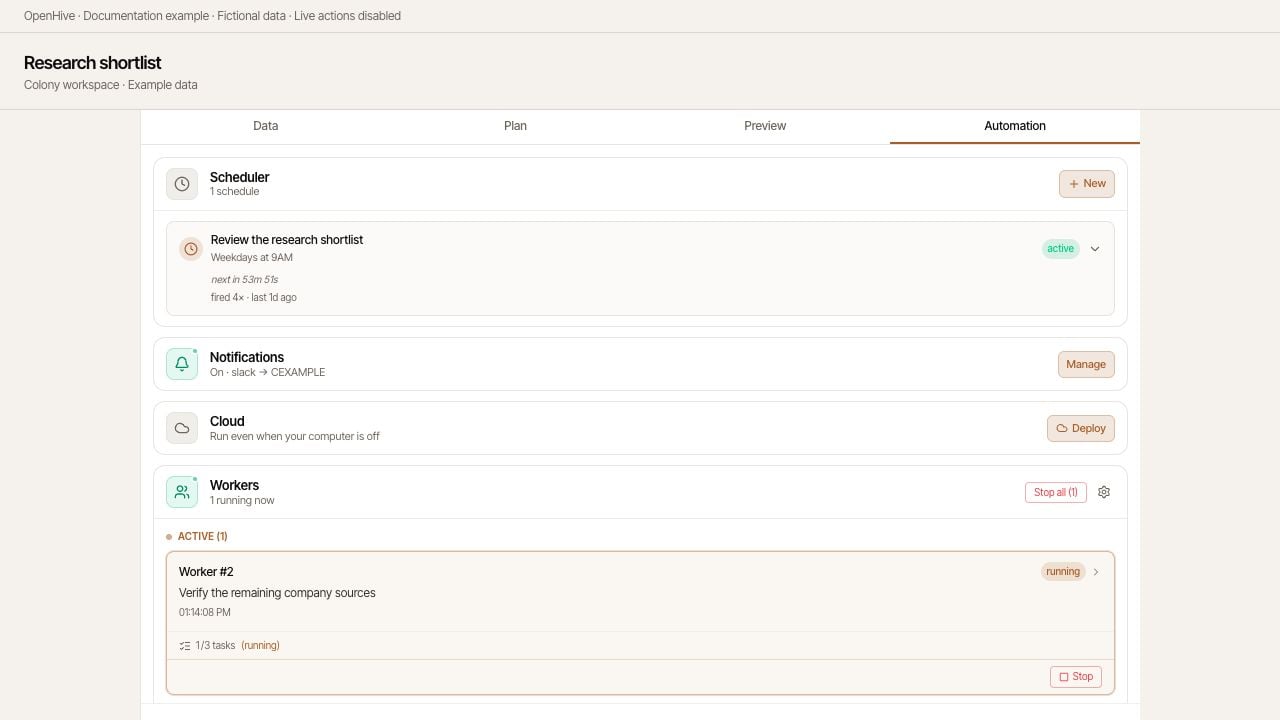
Schedules live alongside the colony's other Automation controls.
In Scheduler, select New. The colony needs a session before this control is available.
Enter a descriptive name, such as Weekday competitor news check.
Choose the schedule type and timing.
In Task, write the instruction to run each time.
Check the timing preview, then choose Create schedule.
Type
How to set it
Daily
Choose a time using your computer’s local time.
Weekly
Choose weekdays and a local time. At least one day is required.
Interval
Enter a positive interval in minutes or hours. The preview notes that the first run starts shortly after creation.
Advanced
Enter a five-field cron expression interpreted in UTC: minute, hour, day, month, weekday.
For example, 0 9 * * 1-5 means 09:00 UTC Monday through Friday. It does not mean 09:00 in your local time zone.
Daily and weekly times are converted to UTC when created. If your time zone or daylight-saving offset changes, check the schedule again and recreate it if necessary to preserve the intended local time.
An example daily schedule with a complete task instruction and a time preview.
Check the three competitor news pages already listed in this colony.Find announcements published since the last successful check.Save new items with company, date, summary, and source URL.Skip URLs already in the table. Report what changed and any failures.Do not send messages or change external records.
Include the scope, how to skip duplicates, and what to do if no new work exists. Do not rely on a schedule name to supply instructions missing from Task.
Expand the schedule in Scheduler. Inspect Next fire, Last fire, and the fire count where available. Then check the colony’s chat, workers, and output. A trigger firing means execution was requested, not that the task succeeded.Force Run invokes the task immediately without waiting for its scheduled time. It performs real work, so use it only when another run is intended.
Expand the schedule and choose Stop trigger to disable it. Use Start trigger to enable it again.Stopping a trigger controls future invocations. If workers are already executing, inspect and stop that work separately when necessary.
For local work, keep OpenHive running and your computer awake and connected. A local schedule is not a cloud deployment. Use Automation → Cloud when you need the colony to run on a cloud computer, and verify that deployment succeeds.See Local and cloud work for the handoff and browser considerations.
{"docsConfig":{"theme":"mint","$schema":"https://mintlify.com/docs.json","name":"OpenHive","description":"Documentation for OpenHive — the desktop app for running agent colonies.","colors":{"primary":"#B5691C","light":"#FABE0A","dark":"#B5691C"},"logo":{"light":"https://mintcdn.com/open-hive/KBnRuZMIKg-Do7q7/logo/light.svg?fit=max\u0026auto=format\u0026n=KBnRuZMIKg-Do7q7\u0026q=85\u0026s=8f01f060000a2934d8eba1cf75bbad73","dark":"https://mintcdn.com/open-hive/KBnRuZMIKg-Do7q7/logo/dark.svg?fit=max\u0026auto=format\u0026n=KBnRuZMIKg-Do7q7\u0026q=85\u0026s=7e541f706344da544c756182caca9700","href":"https://open-hive.com"},"favicon":"https://mintcdn.com/open-hive/KBnRuZMIKg-Do7q7/favicon.svg?fit=max\u0026auto=format\u0026n=KBnRuZMIKg-Do7q7\u0026q=85\u0026s=1718d5156763419a5d21aac3f25306f6","navbar":{"links":[{"href":"https://open-hive.com","label":"Website"},{"href":"https://discord.com/invite/MXE49hrKDk","label":"Discord"}],"primary":{"type":"button","label":"Download","href":"https://open-hive.com"}},"footer":{"socials":{"x":"https://x.com/aden_hq","github":"https://github.com/aden-hive","linkedin":"https://www.linkedin.com/company/teamaden","discord":"https://discord.com/invite/MXE49hrKDk"}},"styling":{"latex":false},"navigation":{"pages":[]}},"deployment":{"deploymentMetadataValue":{"subdomain":"open-hive","hasAudioNarration":false,"actualSubdomain":"open-hive","customDomains":["docs.open-hive.com"],"gitSource":{"type":"github","owner":"aden-hive","repo":"open-hive-docs","deployBranch":"main","contentDirectory":"","isPrivate":true,"mountPath":"","label":""},"chroma":{"latestBuiltDeploymentHistoryId":"6a9dd6a41d75eb55a84c3dc4","collectionId":"5c37c505-4e3c-4a0a-b930-714aa315dd6b","liveDeploymentHistoryId":"6a9dd6a41d75eb55a84c3dc4","schemaVersion":"v3"},"entitlements":{},"buildId":"6a9dd6a41d75eb55a84c3dc4","clientVersion":"0.0.3918","searchFilterCounts":[{"language":"default","tag":"Documentation","count":34},{"language":"default","tag":"Colony workspace","count":6},{"language":"default","tag":"Core concepts","count":6},{"language":"default","tag":"Configuration","count":6},{"language":"default","tag":"Guides","count":6},{"language":"default","tag":"Inbox and senders","count":5},{"language":"default","tag":"Get started","count":4},{"language":"default","tag":"API reference","count":2},{"language":"default","tag":"Overview","count":2},{"language":"default","tag":"Account","count":1}]},"assistantConfig":{"enableAskAiButton":false,"enableStarterQuestions":false,"enableContextualStarterQuestions":false,"enableAskAiSearchBar":true},"hasChatPermissions":false,"hasWebMcpPermissions":false,"toggles":[],"isAtlas":false,"googleFontsInlined":false},"customCss":[],"page":{"pagePath":"guides/scheduling","slug":"/guides/scheduling","pageMetadata":{"title":"Schedule recurring work","description":"Create daily, weekly, interval, or UTC cron schedules and verify each run.","href":"/guides/scheduling"},"description":{"compiledSource":"\"use strict\";\nconst {jsx: _jsx} = arguments[0];\nconst {useMDXComponents: _provideComponents} = arguments[0];\nfunction _createMdxContent(props) {\n const _components = {\n p: \"p\",\n ..._provideComponents(),\n ...props.components\n };\n return _jsx(_components.p, {\n children: \"Create daily, weekly, interval, or UTC cron schedules and verify each run.\"\n });\n}\nfunction MDXContent(props = {}) {\n const {wrapper: MDXLayout} = {\n ..._provideComponents(),\n ...props.components\n };\n return MDXLayout ? _jsx(MDXLayout, {\n ...props,\n children: _jsx(_createMdxContent, {\n ...props\n })\n }) : _createMdxContent(props);\n}\nreturn {\n default: MDXContent\n};\n","frontmatter":{},"scope":{}},"pageType":"default","mdx":{"mdxSource":{"compiledSource":"\"use strict\";const{Fragment:_Fragment,jsx:_jsx,jsxs:_jsxs}=arguments[0];const{useMDXComponents:_provideComponents}=arguments[0];function _createMdxContent(props){const _components={a:`a`,code:`code`,li:`li`,ol:`ol`,p:`p`,pre:`pre`,span:`span`,strong:`strong`,tbody:`tbody`,td:`td`,th:`th`,thead:`thead`,tr:`tr`,..._provideComponents(),...props.components},{CodeBlock,Frame,Heading,Note,OptimizedImage,Table}=_components;if(!CodeBlock)_missingMdxReference(`CodeBlock`,true);if(!Frame)_missingMdxReference(`Frame`,true);if(!Heading)_missingMdxReference(`Heading`,true);if(!Note)_missingMdxReference(`Note`,true);if(!OptimizedImage)_missingMdxReference(`OptimizedImage`,true);if(!Table)_missingMdxReference(`Table`,true);return _jsxs(_Fragment,{children:[_jsx(_components.p,{children:`Use a schedule after you have run the task successfully once. A schedule repeats an instruction; it does not establish that the task’s data, credentials, or output are correct.`}),`\n`,_jsx(Note,{children:_jsx(_components.p,{children:`Screenshots show the desktop interface with fictional example data. Names, messages, counts, and connection states are illustrative, not account defaults or evidence of live activity.`})}),`\n`,_jsx(Frame,{caption:`Schedules live alongside the colony's other Automation controls.`,children:_jsx(OptimizedImage,{src:`https://mintcdn.com/open-hive/pgmm5ty3-3Z8tA3I/images/colony-automation-overview.jpg?fit=max\u0026auto=format\u0026n=pgmm5ty3-3Z8tA3I\u0026q=85\u0026s=7df1a3e2f64c11372f15f40bbdf247c1`,alt:`Schedules live alongside the colony's other Automation controls.`,\"data-og-width\":`1280`,width:`1280`,\"data-og-height\":`720`,height:`720`,\"data-path\":`images/colony-automation-overview.jpg`,\"data-optimize\":`true`,\"data-opv\":`3`,srcset:`https://mintcdn.com/open-hive/pgmm5ty3-3Z8tA3I/images/colony-automation-overview.jpg?w=280\u0026fit=max\u0026auto=format\u0026n=pgmm5ty3-3Z8tA3I\u0026q=85\u0026s=48717377ed6f96b2ad8467206070165a 280w, https://mintcdn.com/open-hive/pgmm5ty3-3Z8tA3I/images/colony-automation-overview.jpg?w=560\u0026fit=max\u0026auto=format\u0026n=pgmm5ty3-3Z8tA3I\u0026q=85\u0026s=ceedb4e5e5f19f6e4153de373c3f7602 560w, https://mintcdn.com/open-hive/pgmm5ty3-3Z8tA3I/images/colony-automation-overview.jpg?w=840\u0026fit=max\u0026auto=format\u0026n=pgmm5ty3-3Z8tA3I\u0026q=85\u0026s=860f59d3bf1f2c73a590256b0204013f 840w, https://mintcdn.com/open-hive/pgmm5ty3-3Z8tA3I/images/colony-automation-overview.jpg?w=1100\u0026fit=max\u0026auto=format\u0026n=pgmm5ty3-3Z8tA3I\u0026q=85\u0026s=7ed4ca5a55783760a8f98f3e93e0b44a 1100w, https://mintcdn.com/open-hive/pgmm5ty3-3Z8tA3I/images/colony-automation-overview.jpg?w=1650\u0026fit=max\u0026auto=format\u0026n=pgmm5ty3-3Z8tA3I\u0026q=85\u0026s=fc03e26a01a84a653bdd38ca2f710087 1650w, https://mintcdn.com/open-hive/pgmm5ty3-3Z8tA3I/images/colony-automation-overview.jpg?w=2500\u0026fit=max\u0026auto=format\u0026n=pgmm5ty3-3Z8tA3I\u0026q=85\u0026s=588e4f45904ef34078ffb1b58eeadb45 2500w`})}),`\n`,_jsx(Heading,{level:`2`,id:`create-a-schedule`,children:`Create a schedule`}),`\n`,_jsxs(_components.ol,{children:[`\n`,_jsxs(_components.li,{children:[`Open the colony and go to `,_jsx(_components.strong,{children:`Automation`}),`.`]}),`\n`,_jsxs(_components.li,{children:[`In `,_jsx(_components.strong,{children:`Scheduler`}),`, select `,_jsx(_components.strong,{children:`New`}),`. The colony needs a session before this control is available.`]}),`\n`,_jsxs(_components.li,{children:[`Enter a descriptive name, such as `,_jsx(_components.strong,{children:`Weekday competitor news check`}),`.`]}),`\n`,_jsx(_components.li,{children:`Choose the schedule type and timing.`}),`\n`,_jsxs(_components.li,{children:[`In `,_jsx(_components.strong,{children:`Task`}),`, write the instruction to run each time.`]}),`\n`,_jsxs(_components.li,{children:[`Check the timing preview, then choose `,_jsx(_components.strong,{children:`Create schedule`}),`.`]}),`\n`]}),`\n`,_jsxs(Table,{children:[_jsx(_components.thead,{children:_jsxs(_components.tr,{children:[_jsx(_components.th,{children:`Type`}),_jsx(_components.th,{children:`How to set it`})]})}),_jsxs(_components.tbody,{children:[_jsxs(_components.tr,{children:[_jsx(_components.td,{children:_jsx(_components.strong,{children:`Daily`})}),_jsx(_components.td,{children:`Choose a time using your computer’s local time.`})]}),_jsxs(_components.tr,{children:[_jsx(_components.td,{children:_jsx(_components.strong,{children:`Weekly`})}),_jsx(_components.td,{children:`Choose weekdays and a local time. At least one day is required.`})]}),_jsxs(_components.tr,{children:[_jsx(_components.td,{children:_jsx(_components.strong,{children:`Interval`})}),_jsx(_components.td,{children:`Enter a positive interval in minutes or hours. The preview notes that the first run starts shortly after creation.`})]}),_jsxs(_components.tr,{children:[_jsx(_components.td,{children:_jsx(_components.strong,{children:`Advanced`})}),_jsx(_components.td,{children:`Enter a five-field cron expression interpreted in UTC: minute, hour, day, month, weekday.`})]})]})]}),`\n`,_jsxs(_components.p,{children:[`For example, `,_jsx(_components.code,{children:`0 9 * * 1-5`}),` means 09:00 UTC Monday through Friday. It does not mean 09:00 in your local time zone.`]}),`\n`,_jsx(Note,{children:_jsx(_components.p,{children:`Daily and weekly times are converted to UTC when created. If your time zone or daylight-saving offset changes, check the schedule again and recreate it if necessary to preserve the intended local time.`})}),`\n`,_jsx(Frame,{caption:`An example daily schedule with a complete task instruction and a time preview.`,children:_jsx(OptimizedImage,{src:`https://mintcdn.com/open-hive/pgmm5ty3-3Z8tA3I/images/colony-schedule-daily.jpg?fit=max\u0026auto=format\u0026n=pgmm5ty3-3Z8tA3I\u0026q=85\u0026s=333c2b819c76c3d99d3da043459db9ea`,alt:`An example daily schedule with a complete task instruction and a time preview.`,\"data-og-width\":`1280`,width:`1280`,\"data-og-height\":`720`,height:`720`,\"data-path\":`images/colony-schedule-daily.jpg`,\"data-optimize\":`true`,\"data-opv\":`3`,srcset:`https://mintcdn.com/open-hive/pgmm5ty3-3Z8tA3I/images/colony-schedule-daily.jpg?w=280\u0026fit=max\u0026auto=format\u0026n=pgmm5ty3-3Z8tA3I\u0026q=85\u0026s=59c027d48a766df192a92dcf3a4f4021 280w, https://mintcdn.com/open-hive/pgmm5ty3-3Z8tA3I/images/colony-schedule-daily.jpg?w=560\u0026fit=max\u0026auto=format\u0026n=pgmm5ty3-3Z8tA3I\u0026q=85\u0026s=d8abf3326f43bba8eecd9ea67539cf41 560w, https://mintcdn.com/open-hive/pgmm5ty3-3Z8tA3I/images/colony-schedule-daily.jpg?w=840\u0026fit=max\u0026auto=format\u0026n=pgmm5ty3-3Z8tA3I\u0026q=85\u0026s=bdfded884d5de1b8c93fa526ebd24bc3 840w, https://mintcdn.com/open-hive/pgmm5ty3-3Z8tA3I/images/colony-schedule-daily.jpg?w=1100\u0026fit=max\u0026auto=format\u0026n=pgmm5ty3-3Z8tA3I\u0026q=85\u0026s=dc18f9c3d6e60187905feefa990a93cd 1100w, https://mintcdn.com/open-hive/pgmm5ty3-3Z8tA3I/images/colony-schedule-daily.jpg?w=1650\u0026fit=max\u0026auto=format\u0026n=pgmm5ty3-3Z8tA3I\u0026q=85\u0026s=53785c484610523befcf014e2ca61095 1650w, https://mintcdn.com/open-hive/pgmm5ty3-3Z8tA3I/images/colony-schedule-daily.jpg?w=2500\u0026fit=max\u0026auto=format\u0026n=pgmm5ty3-3Z8tA3I\u0026q=85\u0026s=c0800a284b96c9125cabe130f33fcc8b 2500w`})}),`\n`,_jsx(Heading,{level:`2`,id:`give-each-run-a-complete-instruction`,children:`Give each run a complete instruction`}),`\n`,_jsx(CodeBlock,{filename:``,numberOfLines:`6`,language:`text`,children:_jsx(_components.pre,{className:`shiki shiki-themes github-light-default dark-plus`,style:{backgroundColor:`#ffffff`,\"--shiki-dark-bg\":`#0B0C0E`,color:`#1f2328`,\"--shiki-dark\":`#D4D4D4`},language:`text`,children:_jsxs(_components.code,{language:`text`,numberOfLines:`6`,children:[_jsx(_components.span,{className:`line`,children:_jsx(_components.span,{children:`Check the three competitor news pages already listed in this colony.`})}),`\n`,_jsx(_components.span,{className:`line`,children:_jsx(_components.span,{children:`Find announcements published since the last successful check.`})}),`\n`,_jsx(_components.span,{className:`line`,children:_jsx(_components.span,{children:`Save new items with company, date, summary, and source URL.`})}),`\n`,_jsx(_components.span,{className:`line`,children:_jsx(_components.span,{children:`Skip URLs already in the table. Report what changed and any failures.`})}),`\n`,_jsx(_components.span,{className:`line`,children:_jsx(_components.span,{children:`Do not send messages or change external records.`})}),`\n`,_jsx(_components.span,{className:`line`,children:_jsx(_components.span,{})})]})})}),`\n`,_jsxs(_components.p,{children:[`Include the scope, how to skip duplicates, and what to do if no new work exists. Do not rely on a schedule name to supply instructions missing from `,_jsx(_components.strong,{children:`Task`}),`.`]}),`\n`,_jsx(Heading,{level:`2`,id:`confirm-it-actually-ran`,children:`Confirm it actually ran`}),`\n`,_jsxs(_components.p,{children:[`Expand the schedule in `,_jsx(_components.strong,{children:`Scheduler`}),`. Inspect `,_jsx(_components.strong,{children:`Next fire`}),`, `,_jsx(_components.strong,{children:`Last fire`}),`, and the fire count where available. Then check the colony’s chat, workers, and output. A trigger firing means execution was requested, not that the task succeeded.`]}),`\n`,_jsxs(_components.p,{children:[_jsx(_components.strong,{children:`Force Run`}),` invokes the task immediately without waiting for its scheduled time. It performs real work, so use it only when another run is intended.`]}),`\n`,_jsx(Heading,{level:`2`,id:`stop-or-restart-a-schedule`,children:`Stop or restart a schedule`}),`\n`,_jsxs(_components.p,{children:[`Expand the schedule and choose `,_jsx(_components.strong,{children:`Stop trigger`}),` to disable it. Use `,_jsx(_components.strong,{children:`Start trigger`}),` to enable it again.`]}),`\n`,_jsx(_components.p,{children:`Stopping a trigger controls future invocations. If workers are already executing, inspect and stop that work separately when necessary.`}),`\n`,_jsx(Heading,{level:`2`,id:`does-my-computer-need-to-stay-on`,children:`Does my computer need to stay on?`}),`\n`,_jsxs(_components.p,{children:[`For local work, keep OpenHive running and your computer awake and connected. A local schedule is not a cloud deployment. Use `,_jsx(_components.strong,{children:`Automation → Cloud`}),` when you need the colony to run on a cloud computer, and verify that deployment succeeds.`]}),`\n`,_jsxs(_components.p,{children:[`See `,_jsx(_components.a,{href:`/guides/local-and-cloud`,children:`Local and cloud work`}),` for the handoff and browser considerations.`]})]})}function MDXContent(props={}){const{wrapper:MDXLayout}={..._provideComponents(),...props.components};return MDXLayout?_jsx(MDXLayout,{...props,children:_jsx(_createMdxContent,{...props})}):_createMdxContent(props)}return{default:MDXContent};function _missingMdxReference(id,component){throw new Error(`Expected `+(component?`component`:`object`)+\" `\"+id+\"` to be defined: you likely forgot to import, pass, or provide it.\")}","frontmatter":{},"scope":{"config":{},"pageMetadata":{"title":"Schedule recurring work","description":"Create daily, weekly, interval, or UTC cron schedules and verify each run.","href":"/guides/scheduling"}}},"mdxSourceWithNoJs":null},"mdxExtracts":{"tableOfContents":[{"title":"Create a schedule","slug":"create-a-schedule","depth":2,"children":[]},{"title":"Give each run a complete instruction","slug":"give-each-run-a-complete-instruction","depth":2,"children":[]},{"title":"Confirm it actually ran","slug":"confirm-it-actually-ran","depth":2,"children":[]},{"title":"Stop or restart a schedule","slug":"stop-or-restart-a-schedule","depth":2,"children":[]},{"title":"Does my computer need to stay on?","slug":"does-my-computer-need-to-stay-on","depth":2,"children":[]}],"codeExamples":{}},"jsLinks":[],"subdomain":"open-hive","siteName":"OpenHive","title":"Schedule recurring work - OpenHive","navMaps":{"firstHrefInVersion":{},"firstHrefInLanguage":{}},"lastModified":"2026-09-06T20:45:41.647Z","originalFileLocation":"guides/scheduling.mdx"},"headHtml":"\u003cscript data-mint-head>(function(){var d=document.documentElement,p=null;if(!p){try{p=localStorage.getItem(\"isDarkMode\")}catch(e){}if(p==='true')p='dark';else if(p==='false')p='light';if(p!=='light'\u0026\u0026p!=='dark'\u0026\u0026p!=='system')p=\"system\"}var r=p==='system'?(matchMedia(\"(prefers-color-scheme: dark)\").matches?'dark':'light'):p;d.classList.remove(r==='dark'?'light':'dark');d.classList.add(r);d.setAttribute(\"data-theme-preference\",p)})();\u003c/script>\u003cmeta data-mint-head name=\"description\" content=\"Create daily, weekly, interval, or UTC cron schedules and verify each run.\">\u003cmeta data-mint-head name=\"application-name\" content=\"OpenHive\">\u003cmeta data-mint-head name=\"generator\" content=\"Mintlify\">\u003clink data-mint-head rel=\"icon\" type=\"image/png\" sizes=\"192x192\" href=\"/mintlify-assets/_mintlify/favicons/open-hive/cyvY73COFAppaB9_/_generated/favicon/android-chrome-192x192.png\" media=\"(prefers-color-scheme: light)\">\u003clink data-mint-head rel=\"apple-touch-icon\" type=\"image/png\" sizes=\"180x180\" href=\"/mintlify-assets/_mintlify/favicons/open-hive/cyvY73COFAppaB9_/_generated/favicon/apple-touch-icon.png\">\u003clink data-mint-head rel=\"icon\" type=\"image/png\" sizes=\"16x16\" href=\"/mintlify-assets/_mintlify/favicons/open-hive/cyvY73COFAppaB9_/_generated/favicon/favicon-16x16.png\" media=\"(prefers-color-scheme: light)\">\u003clink data-mint-head rel=\"icon\" type=\"image/png\" sizes=\"32x32\" href=\"/mintlify-assets/_mintlify/favicons/open-hive/cyvY73COFAppaB9_/_generated/favicon/favicon-32x32.png\" media=\"(prefers-color-scheme: light)\">\u003clink data-mint-head rel=\"shortcut icon\" type=\"image/x-icon\" href=\"/mintlify-assets/_mintlify/favicons/open-hive/cyvY73COFAppaB9_/_generated/favicon/favicon.ico\" media=\"(prefers-color-scheme: light)\">\u003clink data-mint-head rel=\"icon\" type=\"image/png\" sizes=\"192x192\" href=\"/mintlify-assets/_mintlify/favicons/open-hive/cyvY73COFAppaB9_/_generated/favicon-dark/android-chrome-192x192.png\" media=\"(prefers-color-scheme: dark)\">\u003clink data-mint-head rel=\"icon\" type=\"image/png\" sizes=\"16x16\" href=\"/mintlify-assets/_mintlify/favicons/open-hive/cyvY73COFAppaB9_/_generated/favicon-dark/favicon-16x16.png\" media=\"(prefers-color-scheme: dark)\">\u003clink data-mint-head rel=\"icon\" type=\"image/png\" sizes=\"32x32\" href=\"/mintlify-assets/_mintlify/favicons/open-hive/cyvY73COFAppaB9_/_generated/favicon-dark/favicon-32x32.png\" media=\"(prefers-color-scheme: dark)\">\u003clink data-mint-head rel=\"shortcut icon\" type=\"image/x-icon\" href=\"/mintlify-assets/_mintlify/favicons/open-hive/cyvY73COFAppaB9_/_generated/favicon-dark/favicon.ico\" media=\"(prefers-color-scheme: dark)\">\u003cmeta data-mint-head property=\"og:title\" content=\"Schedule recurring work - OpenHive\">\u003cmeta data-mint-head property=\"og:description\" content=\"Create daily, weekly, interval, or UTC cron schedules and verify each run.\">\u003cmeta data-mint-head property=\"og:site_name\" content=\"OpenHive\">\u003cmeta data-mint-head property=\"og:url\" content=\"https://docs.open-hive.com/guides/scheduling\">\u003cmeta data-mint-head property=\"og:type\" content=\"website\">\u003cmeta data-mint-head property=\"og:image\" content=\"https://open-hive.mintlify.app/_mintlify/api/og/v2?division=Colony+workspace\u0026amp;title=Schedule+recurring+work\u0026amp;description=Create+daily%2C+weekly%2C+interval%2C+or+UTC+cron+schedules+and+verify+each+run.\u0026amp;theme=da4fbb89f39eea3049fa93a6\u0026amp;signature=b7adac4d6ec1b3e9b71c6856ca43bfd3f222db070d0e02dea2c444b259061631\">\u003cmeta data-mint-head property=\"og:image:width\" content=\"1200\">\u003cmeta data-mint-head property=\"og:image:height\" content=\"630\">\u003cmeta data-mint-head name=\"twitter:card\" content=\"summary_large_image\">\u003cmeta data-mint-head name=\"twitter:title\" content=\"Schedule recurring work - OpenHive\">\u003cmeta data-mint-head name=\"twitter:description\" content=\"Create daily, weekly, interval, or UTC cron schedules and verify each run.\">\u003cmeta data-mint-head name=\"twitter:image\" content=\"https://open-hive.mintlify.app/_mintlify/api/og/v2?division=Colony+workspace\u0026amp;title=Schedule+recurring+work\u0026amp;description=Create+daily%2C+weekly%2C+interval%2C+or+UTC+cron+schedules+and+verify+each+run.\u0026amp;theme=da4fbb89f39eea3049fa93a6\u0026amp;signature=b7adac4d6ec1b3e9b71c6856ca43bfd3f222db070d0e02dea2c444b259061631\">\u003cmeta data-mint-head name=\"twitter:image:width\" content=\"1200\">\u003cmeta data-mint-head name=\"twitter:image:height\" content=\"630\">\u003cmeta data-mint-head name=\"msapplication-config\" content=\"/mintlify-assets/_mintlify/favicons/open-hive/cyvY73COFAppaB9_/_generated/favicon/browserconfig.xml\">\u003cmeta data-mint-head name=\"apple-mobile-web-app-title\" content=\"OpenHive\">\u003cmeta data-mint-head name=\"msapplication-TileColor\" content=\"#B5691C\">\u003clink data-mint-head rel=\"canonical\" href=\"https://docs.open-hive.com/guides/scheduling\">\u003clink data-mint-head rel=\"alternate\" type=\"application/xml\" href=\"/sitemap.xml\">\u003clink data-mint-head rel=\"alternate\" type=\"text/markdown\" href=\"/guides/scheduling.md\">\u003cscript data-mint-head type=\"application/ld+json\">{\"@context\":\"https://schema.org\",\"@graph\":[{\"@type\":\"Organization\",\"@id\":\"https://docs.open-hive.com/#organization\",\"name\":\"OpenHive\",\"url\":\"https://docs.open-hive.com\",\"logo\":{\"@type\":\"ImageObject\",\"url\":\"https://mintcdn.com/open-hive/KBnRuZMIKg-Do7q7/logo/light.svg?fit=max\u0026auto=format\u0026n=KBnRuZMIKg-Do7q7\u0026q=85\u0026s=8f01f060000a2934d8eba1cf75bbad73\"}},{\"@type\":\"WebSite\",\"@id\":\"https://docs.open-hive.com#website\",\"name\":\"OpenHive\",\"url\":\"https://docs.open-hive.com\",\"publisher\":{\"@id\":\"https://docs.open-hive.com/#organization\"}},{\"@type\":\"WebPage\",\"@id\":\"https://docs.open-hive.com/guides/scheduling#webpage\",\"url\":\"https://docs.open-hive.com/guides/scheduling\",\"name\":\"Schedule recurring work\",\"description\":\"Create daily, weekly, interval, or UTC cron schedules and verify each run.\",\"dateModified\":\"2026-09-06T20:45:41.647Z\",\"isPartOf\":{\"@id\":\"https://docs.open-hive.com#website\"},\"breadcrumb\":{\"@id\":\"https://docs.open-hive.com/guides/scheduling#breadcrumb\"}},{\"@type\":\"BreadcrumbList\",\"@id\":\"https://docs.open-hive.com/guides/scheduling#breadcrumb\",\"itemListElement\":[{\"@type\":\"ListItem\",\"position\":1,\"name\":\"Colony workspace\",\"item\":\"https://docs.open-hive.com/guides/colony-workspace\"},{\"@type\":\"ListItem\",\"position\":2,\"name\":\"Schedule recurring work\",\"item\":\"https://docs.open-hive.com/guides/scheduling\"}]},{\"@type\":[\"Article\",\"TechArticle\"],\"@id\":\"https://docs.open-hive.com/guides/scheduling#article\",\"headline\":\"Schedule recurring work\",\"name\":\"Schedule recurring work\",\"description\":\"Create daily, weekly, interval, or UTC cron schedules and verify each run.\",\"url\":\"https://docs.open-hive.com/guides/scheduling\",\"mainEntityOfPage\":{\"@id\":\"https://docs.open-hive.com/guides/scheduling#webpage\"},\"dateModified\":\"2026-09-06T20:45:41.647Z\",\"publisher\":{\"@id\":\"https://docs.open-hive.com/#organization\"},\"isPartOf\":{\"@id\":\"https://docs.open-hive.com#website\"}}]}\u003c/script>\u003cscript data-mint-head type=\"application/ld+json\">{\"@context\":\"https://schema.org\",\"@type\":\"WebSite\",\"name\":\"OpenHive\",\"creator\":{\"@type\":\"Organization\",\"name\":\"Mintlify\",\"url\":\"https://mintlify.com\"}}\u003c/script>","siteName":"OpenHive","nav":{"global":null,"tabs":[{"tab":"Documentation","groups":[{"group":"Get started","pages":[{"title":"OpenHive","href":""},{"title":"Your first task","href":"/quickstart"},{"title":"Installation","href":"/installation"},{"title":"Troubleshooting","href":"/troubleshooting"}]},{"group":"Core concepts","pages":[{"title":"How OpenHive organizes work","href":"/concepts/overview"},{"title":"Colonies","href":"/concepts/colonies"},{"title":"Queens","href":"/concepts/queens"},{"title":"Sessions and progress","href":"/concepts/sessions"},{"title":"Skills and tools","href":"/concepts/skills"},{"title":"Memory","href":"/concepts/memory"}]},{"group":"Colony workspace","pages":[{"title":"Working in a colony","href":"/guides/colony-workspace"},{"title":"Data: inspect and export results","href":"/colony/data"},{"title":"Plan: tasks, blockers, and history","href":"/colony/plan"},{"title":"Automation: run and supervise work","description":"Use Scheduler, Notifications, Cloud, and Workers without confusing their controls.","href":"/colony/automation"},{"title":"Schedule recurring work","href":"/guides/scheduling"},{"title":"Local and cloud work","description":"Choose where a colony runs and verify its environment before leaving it unattended.","href":"/guides/local-and-cloud"}]},{"group":"Inbox and senders","pages":[{"title":"Email: inboxes, accounts, and profiles","href":"/email/overview"},{"title":"Inboxes: sync and find conversations","sidebarTitle":"Inboxes","href":"/guides/inbox"},{"title":"Delivery accounts: connect a sender","sidebarTitle":"Delivery accounts","href":"/configuration/senders"},{"title":"Sending profiles: names and signatures","href":"/email/sending-profiles"},{"title":"Draft, preview, and send a reply","href":"/email/replying"}]},{"group":"Guides","pages":[{"title":"Write a useful task brief","href":"/guides/task-briefs"},{"title":"Find and qualify prospects","href":"/guides/first-colony"},{"title":"Foundry","href":"/guides/foundry"},{"title":"Use and customize prompts","href":"/guides/prompt-library"},{"title":"CRM","href":"/guides/crm"},{"title":"Connect your browser","href":"/guides/browser"}]},{"group":"Configuration","pages":[{"title":"Connect accounts and API keys","href":"/configuration/credentials"},{"title":"Set action limits","href":"/configuration/rate-limits"},{"title":"Manage skills and tools","href":"/configuration/skills-library"},{"title":"Memory library","href":"/configuration/memory-library"},{"title":"Org chart","href":"/configuration/org-chart"},{"title":"Settings and workspace","href":"/configuration/settings"}]},{"group":"Account","pages":[{"title":"Credits and model access","href":"/account/credits"}]}]},{"tab":"API reference","pages":[{"title":"API reference","href":"/api-reference/introduction"}]}]},"title":"Schedule recurring work - OpenHive","buildId":"dpl_22zLaHtK6fmmSqApXTTP5tC7UBZn","deploymentId":"dpl_22zLaHtK6fmmSqApXTTP5tC7UBZn","dynamics":["07c022d89b","a74be98ba7"],"chunks":["Frame-Qhh4ynaL.js","DynamicMarkdown-UgxZIUya.js","zoom-image-lightbox-BxIiCHya.js","PlusIcon-Br4qdG7I.js","lightbox-handle-r17bVUz3.js"]}